Monday, August 05, 2013


Wednesday, June 05, 2013
Introduction to Big Data
Big Data
Data is a precious thing because they last longer than systems – Tim
Barnes Lee
Introduction
Big Data, as the name describes itself, it is collection of
huge amount of data. Data has always been important to mankind and society by
various means. But during past few years
data is collected and used for variety of purposes. The major factor which differs Big Data from
normal Data which can be handled in a DBMS or RDBMS is that; Big Data is very large
volume, it has no defined structure, it includes whole lot of data which is
being created from various channels like emails or social media like twitter,
Facebook, LinkedIn etc.
What can be done with a lot of data?
When we have a gathered data, the best use data can be made
by following three ways:
1- To
know what has happened
2- To
understand and explain why it actually happened
3- Most
importantly predict what will happen
Big Data was always around but this term became more popular
in the recent time. Think of a weather
forecast system which can predict weather based on data collected. Another
great example is traffic support system of a GPS, which is reading data from
various satellites to re-direct you to the roads with less traffic or highways
etc. If you dig into the details how these systems are being made and trusted
is fully based on their capabilities of acquiring, collecting, processing and
then doing a predictive analysis with that data to produce results which are
almost accurate.
Until past few years forecasting and predictive analysis
with data was done by National Weather Labs, Intelligence community etc. but
now it is much more since then.
How Big Data is being captured and who contributes to Big Data
Big Data has grown tremendously and it’s increasing like
anything in an uncontrollable fashion. Most of the world’s data today approx
90% was generated in last two years. The reason of that is our day to day contribution
in various digital forms of data for example, Facebook, tweets, Pictures etc.
Hence, it won’t be surprising that in fact web does millions of activities per second and so huge chunk of data is being stored in server logs. You must have heard that goggle stores and some people say steals all the information of your activities. For example, your search strings. This is same with any search engine.
Hence, it won’t be surprising that in fact web does millions of activities per second and so huge chunk of data is being stored in server logs. You must have heard that goggle stores and some people say steals all the information of your activities. For example, your search strings. This is same with any search engine.
One of the most interesting question is that who actually
contributes to thi huge data building process. Well the answer is simple, WE.
Yes, we all are helping the various companies to gather, process and then
predict via the data which is being contributed on day to day basis by approx
over 800 million active Facebook users, approx over 40 billion photos, over 200 million active
users on Twitter etc. Just FYI< Facebook’s Big data analytics tool can
process more than 20 billion events a day.
So, whatever you do actually adds into the avalanche of data
for further processing to serve the mankind with the information they need and
most importantly at the right time when they would really need it (an example
will follow in the article below).
Two Great Examples where Big Data changed the world
India
You must not have forgotten Amir Khan’s Stayamev Jayate, one
of the most popular show released in May 2012, was using Big Data. During the
execution of the show 1000+ engineers were working behind the scene to capture
all the data that will be created on Facebook, twitter, websites and blogs etc.
to actually capture not only the opinion about the show, but category of
people, from where including count of positive and negatives etc.
The producers
utilized the technology to define the future episodes, the channel reported
traffic of 40,000+ tweets during the 90 minutes of the show.
USA
Obama the President of USA, he was depending on Big Data for
his election campaign. His app “Obama for America” connected all the people who
were in favor of him and join the campaign. 2+ million joined on this app, and
this app will show you people in your neighborhood who likes Obama, their name,
age, address and gender etc. including various other personal details.
How Big Data is being used today and what is next
Based on your search in Bing and google, you will observe some
advertisements on your social media sites like Facebook which are related to
your searches. Companies are working on interesting path which not only
utilizes Big Data but also combine various technologies together. Assume, in
near future you walked into a store and based on your last purchases made in
the store you start getting information about the deals, discounts etc. on your
phone, twitter etc.
To make this
possible, store needs to grab all the data including your purchases, your
Facebook likes, your searches on various search engines etc. and as soon as you
enter into the store they sense you buy your handheld device and start
analyzing and processing the data to predict what you might like based on the
patterns of your purchase and search history interesting isn’t it?
Tuesday, June 04, 2013
Article on CLR-Internals- Process and Application Domain
Read my new article on C# Corner about CLR-Internals- Process and Application Domain

Monday, May 06, 2013
Operation taking longer than expected - Visual Studio 2012
One of the long lived issue I struggled with was Visual Studio 2012's "Operation taking longer than expected", as you can see in the screenshot shown below.
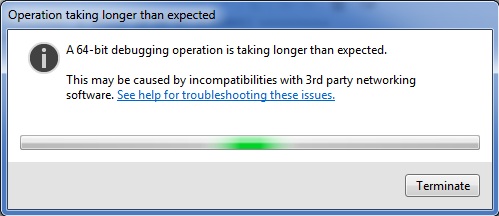
I tried many opetions including the most frustating one- re-install and repair the Visual Studio 2012.
The major problem of this issue is that it doesn't allow you to do many critical things for example "Attching a process during debugging" etc.
The solution to this problem is:
- Navigate to C:\Program Files (x86)\Microsoft Visual Studio 11.0\Common7\IDE\Remote Debugger
- Open x64 folder and rename the msvsmon.exe file to msvsmon_old.exe
- Now, navigate to x86 folder and copy msvsmon.exe and paste it into x64 folder.
- Restart the Visusl Studio 2012 IDE, and now try attching to process during debugging.
Friday, May 03, 2013
Subscribe to:
Posts (Atom)