Sunday, February 10, 2013

Value of Knowledge


A giant ship engine failed. The ship’s owners tried one expert after another, but none of them could figure out how to fix the engine. Then they brought in an old man who had been fixing ships since he was a young. He carried a large bag of tools with him, and when he arrived, he immediately went to work. He inspected the engine very carefully, top to bottom. 

Two of the ship’s owners were there, watching this man, hoping he would know what to do. 

After looking things over, the old man reached into his bag and pulled out a small hammer. He gently tapped something. Instantly, the engine lurched into life. He carefully put his hammer away. The engine was fixed! 

A week later, the owners received a bill from the old man for ten thousand dollars. “What?!” the owners exclaimed. “He hardly did anything!” So they wrote to the old man saying, “Please send us an itemized bill.” 

The man sent a bill that read: 

Tapping with a hammer…… …… ……… $ 2.00
Knowing where to tap……… …… ……… $ 9,998.00 

Moral :- Effort is important, but knowing where to make an effort makes all the difference! Keep studying hard. Don’t give up!


Friday, February 01, 2013

Why .NET 4.5 doesn't have a Client Profile

In this post I will explain why .NET 4.5 doesn't support and what is the benefit .NET 3.5 and .NET4.0 provides with their supported Client Profile flavor.
As we all know there are many type of applications and hence what is required by one application may not be necessarily required by other type of application. For example, System.Web is only used by ASP .NET / Web apps, this is of no use for Windows Forms app.

Now if you think from a deployment's point of view, you would want your installer to be as optimized and small as possible, so it takes minimum and required on the client machine, and this can be achieved by Client Profile flavor of.NET 3.5 and 4.0.
Let's see how Microsoft made .NET Client Profile.Microsoft removed ASP .NET, MSBuild, Advanced WCF and Data support for Oracle to cut the framework into smaller and optimized footprint.

.NET 4.5 is already optimized and tuned for quicker deployment and takes small disk space. Hence, no more .NET 4.5 Client Profile.

Thursday, January 24, 2013

.NET Client Profile Vs. .NET Framework


.NET Client Profile is supported by .NET Ver. 3.5 and 4.0. It is designed for client applications like Windows Forms. Client Profile version of .NET Framework is lightweight subset of Framework. This enables quicker deployment and small installation packages.


Web Application doesn’t support Client Profile version of the Framework.


Microsoft has removed Client Profile from latest version of .NET Framework 4.5 and hence with .NET 4.5 there is no Client Profile as shown in the image below.


Sunday, December 23, 2012

Microsoft Technology Associate (MTA) a new Certification Track

Microsoft just introduced a new certification track MTA, Microsoft Technology Associate.
This is designed for the people who are seeking an entry point into the Microsoft technology world.

This track has exams especially designed for topics like:
  • .NET Fundamentals
  • Windows Development Fundamentals
  • Web Development Fundamentals
  • Security Fundamentals
  • Networking Fundamentals
  • Windows Operating System Fundamentals
etc.....

These exams will establish  a solid base for new Microsoft technology aspirants to become MCTS or MCSD certified later on.

An already experienced developer/professional in Microsoft Technologies, does need to earn this MTA exam, but having one won't hurt, as all that matters is Rock Solid Fundamentals.


Saturday, October 27, 2012

Nuget - Visual Studio Package


NuGet Package Manager Download URL

Problem- Many times during development it become tedious to look for right assemblies to be added to the project's references. For example, Entity Framework, Enterprise Library blocks, JSON etc.
Due to the nature of application's dependency on right assemblies; developers spend a good amount of time in searching the right installer URL of the utility packages, or look for assemblies in the machine and then reference those.


Solution- NuGet is an open source based developement focused system for implementing packages in the .NET platform based applications. NuGet is designed to simplify the process of bringing/adding Microsoft (Enterprise Blocks etc.) and various third party(Ninjectm JSON etc.) libraries into a .NET application during development.

Once you have installed Nuget, you no longer need to worry about looking for assembly references for various frameworks, blocks etc. for example, JSON, Enterprise Library, Entity Framework etc.

You just need to right-click on the References and click on Manage NuGet Package as shown in the figure below:


This will open a new window, in which you can search your desired package and install it as shown in the figure below:


Now if you will look under thre References, you will notice that assembly references are added through NuGet. NuGet helped you save the time and effrot to add existing assemblies or install and then add in case it was new.


Now, you have got the assemblies your application requires, you can begin with code now to invoke the functionality from added assemblies.

It's productive isn't it?
 

Monday, October 01, 2012

Logging Application Block (Enterprise Library 5.0)


EnterpriseLibrary version- 5.0 Download url
Language used in code sample below - C#

Logging is a very important feature for many applications and serves the very critical purpose in a software application's life. Logging enables to look for monitoring data and also document what is happening in-side and out-side of the application; also known as auditing.

Most common places to log such activities, information and data are:
1- Flat files (.log/.txt)
2- Event logs (Windows event viewer) and
3- Database.

In the absence of logging application block, the logging code needs to be repeated in the application at many places. This code will also include .NET library and function calls based on type of place you want to log the information. Hence, logging application block simply de-couples the logging functionality from the application code.

Configuring the Logging Application Block

1- Open your Visual Studio project, if not already available, add an app.config file
2- Open Microsoft Enterprise Library console.
3- In the Blocks menu, choose "Add Logging Settings" option, this will appear as shown here:


 4- Based on your requirements add listners (File, Event, Database etc.).


 5- Describe "Event Log" target listner


6- Describe "Flat File" trace listner


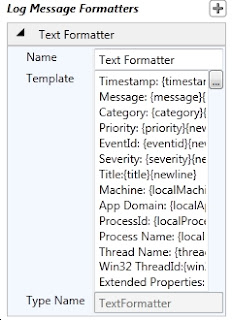
7- Describe "Message Formatter"


Now save this configuraton by clicking File--> Save option. and choose your added .config file,
this will be modified and will appear as shown here.
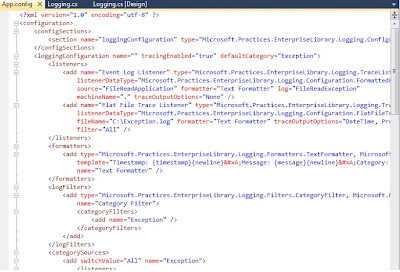


Now you can add the code to enable the Logging from your application into the defined "Target Trace Listners" in our case "Flat File" and "Event Log".

I have designed a Windows Form application which reads a file, from provided path location, if file is found it loads the cntent into the text box, else in case of an exception "FileNotFoundException" the error info is logged into the Log file (c:\exception.log) and Event Log.


C# Code will look like this
 
using Microsoft.Practices.EnterpriseLibrary.Logging;
 
private void btnReadFile_Click(object sender, EventArgs e)
{
     StreamReader sr = null;

     try
      {
          sr = new StreamReader(txtFilePath.Text);

          txtFileContent.Text = sr.ReadToEnd();
     }
     catch (FileNotFoundException)
     {
         txtFileContent.Text="Exception details logged log file  
                                and Event Viewer";               

         LogEntry objLog = new LogEntry();

         objLog.Message = "Please provide valid Filename";
         objLog.Categories.Add("File Read Error");

         Logger.Write(objLog);               
     }

     finally
      {
         if (sr != null)
          {
            sr.Close();
         }
     }    
}
 
 
Now if you open the C:\Exception.log you will see:
 
----------------------------------------
Timestamp: 10/1/2012 7:35:03 PM
Message: There is no explicit mapping for the categories 'File Read Error'. The log entry was:
Timestamp: 10/1/2012 7:35:03 PM
Message: Please provide valid Filename
Category: File Read Error
Priority: -1
EventId: 0
Severity: Information
Title:
Machine: VIDYAVRAT-PC
App Domain: LoggingApplicationBlock.vshost.exe
ProcessId: 9164
Process Name: C:\VidyaVrat\Microsoft .NET\Application Code POCs\EnterpriseLibrary-Application Blocks\LoggingApplicationBlock\LoggingApplicationBlock\bin\Debug\LoggingApplicationBlock.vshost.exe
Thread Name:
Win32 ThreadId:13588
Extended Properties:
Category:
Priority: -1
EventId: 6352
Severity: Error
Title:
Machine: VIDYAVRAT-PC
App Domain: LoggingApplicationBlock.vshost.exe
ProcessId: 9164
Process Name: C:\VidyaVrat\Microsoft .NET\Application Code POCs\EnterpriseLibrary-Application Blocks\LoggingApplicationBlock\LoggingApplicationBlock\bin\Debug\LoggingApplicationBlock.vshost.exe
Thread Name:
Win32 ThreadId:13588
Extended Properties:
----------------------------------------

 
Also, if you open the EventVwr.exe then you will see:
 
 
This concludes that how Logging application block enables you to write small amount of code to do such a critical task of auditing.